
- Free up to 8 titles
- No account needed for kids
- Hosted in Europe
Shows, movies, cartoons…
Who's watched what? The whole family finally knows.
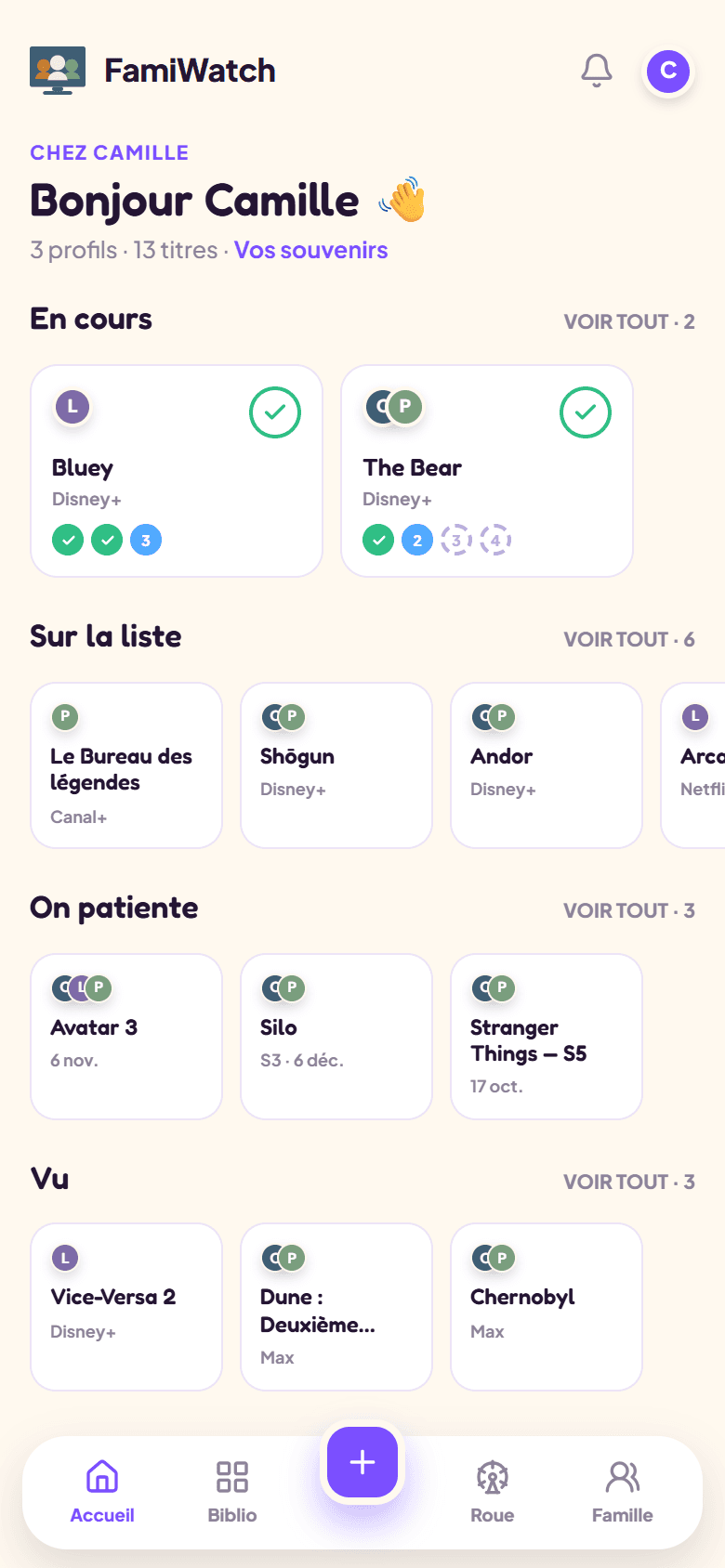
FamiWatch tracks your household's shows and movies: one check per member on every title, season by season or episode by episode — and a reminder when a release you're waiting for arrives. No social feed, no ads, no fuss.
Léa finished season 2
Dune 3 is out today
Real screenshot of the app — fictional demo data.
Our promises
Made for families, not a social network
No comments, no likes, no feed: just your household and its screens. A clear, warm interface.
GDPR & EU hosting
Your data stays in Europe and belongs to you — export and delete anytime. First names and titles are encrypted at rest.
No ads, no trackers
No advertising, no marketing cookies, no data resale.
Features
The tracking your sofa was waiting for
Every title carries everyone's check: no more “wait, where are you at?” before pressing play.
One card per viewing
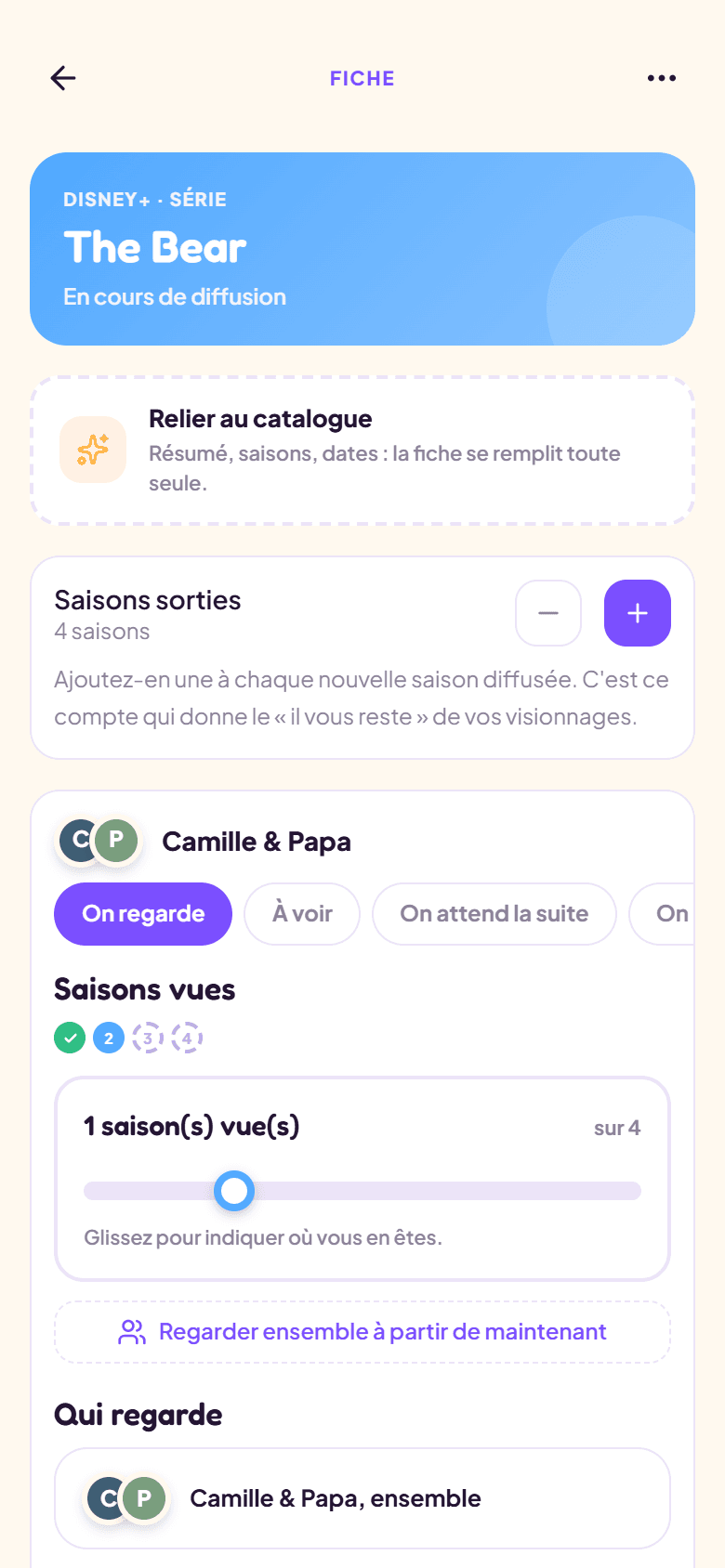
Jean and Anne watch the show together: one card, one progress. Thibaut follows it on his own: his own card. Same title, two stories.
By season or by episode
Set the tracking precision for the whole household, and override it show by show. Switching to episodes never makes you re-enter anything.
Profiles without accounts
A first name, a color, a photo if you like: kids and grandparents get their profile without email or password.
Upcoming releases
Note an announced movie's date: on the day, the card moves to “To watch” by itself and everyone gets their notification.
All your platforms
Netflix, Disney+, cinema, library DVDs: the platform is just free text — everything the family watches has its place.
Installable on your phone
FamiWatch installs like a real app (PWA) — and on Android, it's also on Google Play. It notifies you: that's where episodes get checked, from the sofa. On iPhone, it is also available on the App Store.
The evening wheel
Nobody can decide? Spin the wheel. It picks from what's waiting for you, for whoever you choose, and even on a single platform — or on everything but the one whose subscription is ending.
Sorts itself out
Watching, on the list, waiting, seen: the home screen puts every title where it belongs. A season finished, a release landing, and the card moves pile on its own.
Everyday life
Made for real life
Added in three steps
What is it, where are you at, who's watching. Say “I'm on season 3” and the earlier seasons check themselves.
Progress is never lost
Switching to episode tracking? A season already checked counts as fully seen — correct only if needed.
A rough date is enough
“Season 6 announced, no date”: a reminder can live with just a note; the date comes when it's known.
The catalogue types for you (Premium)
Type “Outer Banks”: the card arrives filled in — synopsis, genres, seasons already out, poster, platform detected. Change anything you like. Typing by hand stays free, and always available.
Nothing gets lost
Someone drops off at season 3? Their card turns “stopped”, their progress stays — and they can pick it back up anytime.
How it works
Ready in 1 minute
Create your account
30 seconds, one email address, that's all. A single account for the whole household.
Add profiles and titles
One profile per person (first name + colour), then your current shows and movies — 8 titles free.
Check, and catch up together
Everyone checks what they've seen; awaited releases remind you all by themselves.
FAQ
Frequently asked questions
Is FamiWatch free?
Yes, up to 8 tracked titles and 1 profile. The Premium plan (€1.49 / month or €14.99 / year, 7-day trial with card, no commitment) unlocks unlimited titles, unlimited family profiles, cards filled in automatically by the catalogue, release alerts as notifications and list export.
Do family members need to create an account?
No. One account is enough for the household: each member gets a local profile (first name, colour, photo if you like), without email or password. Kids check their episodes without signing up.
How do release reminders work?
It depends on what FamiWatch knows. For a title from the catalogue, it checks every morning and tells you once it's true: “season 5 is out”. For a date you noted yourself (even approximate), it asks you when it's due: “is it available?” — you confirm or push back. You choose to be reminded on the day, 1 day, 1 week or 1 month before, and you never get two messages about the same title on the same day.
Do I need to connect Netflix or another platform?
No, nothing to connect. A title's platform is just free text (“Netflix”, “Cinema”, “DVD”…). FamiWatch is deliberately declarative: your streaming accounts are never asked for.
Do I have to enter everything by hand?
Not since the automatic catalogue (a Premium feature): search for the title and its card arrives filled in — synopsis, genres, seasons already out, named episodes, poster, platform detected. From there FamiWatch keeps following the show for you: a new season comes back onto your list by itself, a pushed-back date fixes itself. And typing by hand stays free and always available — for a title missing from the catalogue or simply by preference.
Can two people watch a show together, or choose who follows what?
Yes — that's the heart of FamiWatch. A viewing is a “card”: one or more profiles watching together, with their own status and their own progress. The same title can carry several cards in parallel — the pair moving forward together, the person following it alone, the one who stopped at season 3. And the day two people decide to continue together, the “Watch together from now on” action merges their cards without losing anything.
Can I track a show episode by episode?
Yes. The household picks its default setting (by season or by episode), and each show can override it. When switching to episode tracking, an already-checked season stays acquired — nothing to re-enter.
Can I cancel Premium anytime?
Yes, effective at the end of the paid period. How you cancel depends on where you subscribed. On the website, by card: My account → Manage my subscription (secure Stripe portal). In the iPhone or Android app: from your Apple or Google account settings, at least 24 hours before renewal — the “Manage or cancel my subscription” link in My account takes you there. Your 8 oldest titles and first profile stay usable, and nothing is deleted.
Can I install FamiWatch on my phone?
Yes, in two ways. On Android, FamiWatch is available on Google Play. And everywhere, it installs like an app (PWA) from the browser: on Android, Chrome offers “Install app”; on iPhone, Safari → Share button → “Add to Home Screen”. That's also what makes release reminders possible. On iPhone, it is also available on the App Store.
Is my data protected?
Yes. Data is hosted in the European Union, encrypted in transit — and sensitive data (profile first names, tracked titles, notes) is additionally encrypted at rest. No ad trackers; export and deletion anytime.
Ready to know who's watched what?
Track up to 8 titles for free — the household catches up tonight. Premium at €1.49 / month or €14.99 / year for unlimited titles and the whole family's profiles.
Try it free